

Key Takeaways
- Local SEO for small business comes down to three things Google calls relevance, distance, and prominence. You can only influence relevance and prominence, so that is where all 90 days go.
- Days 1 to 30 fix the foundation (Business Profile, category, listings, website), days 31 to 60 build relevance and reviews, and days 61 to 90 grow prominence and measure calls.
- Reviews now carry more weight: in Bright Local’s 2026 survey, 74% of US consumers looked for reviews from the last three months, and 80% preferred businesses that reply to every review.
- Track calls, direction requests, and website clicks from your Business Profile, not just rankings checked from your own office.
Introduction
If your phone only rings when a customer already knows your name, you are missing the people searching for what you do nearby. Local SEO for small businesses is how you reach them: it puts you in the Google Maps results, the local pack, and, increasingly, AI answers when someone searches “plumber near me” or “best bakery in Leeds.”
The problem is rarely knowing how to do local SEO. It is knowing what to do first with limited time. This guide turns local SEO into a 90-day plan, split into three 30-day phases, with what to expect at each stage and how to measure the calls it brings in. It is the same order we follow at Lynxsol when we deliver local SEO services for small businesses, so you can follow it yourself or see what a provider should be doing for you.
What Local SEO for Small Business Means in 2026
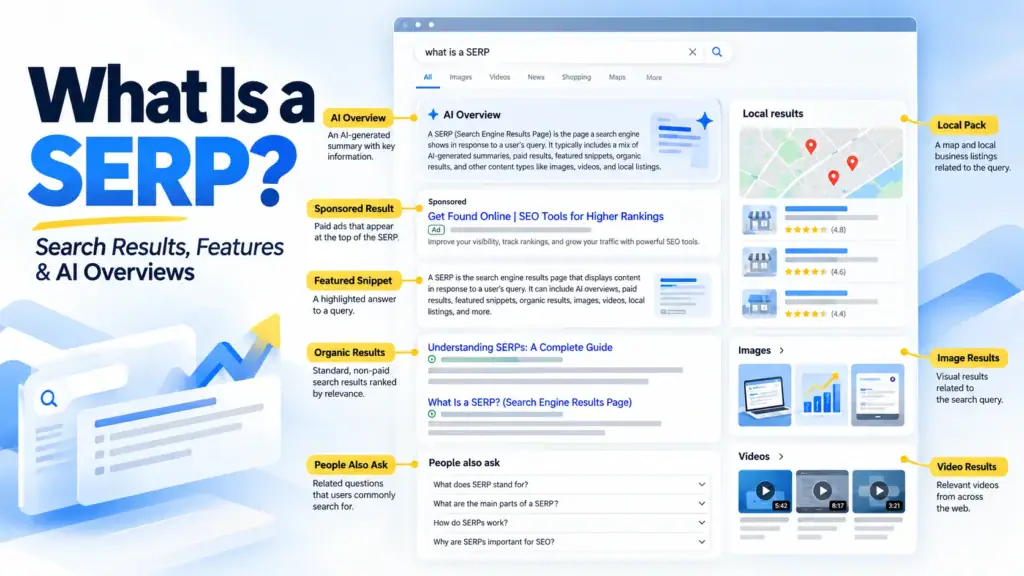
Local SEO, sometimes called local business SEO or local search optimization, is the work of making your business show up when people nearby search for your products or services. It covers three places on Google: the map results (often called the local pack), the regular organic results below them on the search engine results page, and the AI-written answers that now appear above both.
Google explains on its local ranking help page that local results are based mainly on relevance, distance, and prominence:
- Relevance: how well your Business Profile matches what someone searched for.
- Distance: how far your business is from the person searching.
- Prominence: how well known your business is, including reviews, ratings, and links from other websites.
Google also states plainly that there is no way to pay for a better local ranking. You cannot change distance either, so a local SEO strategy for small business spends its effort on relevance and prominence.
Industry research points to the same priorities. In Whitespark’s 2026 Local Search Ranking Factors survey, 47 local SEO experts ranked the primary Business Profile category, the searcher’s distance from the business, and keywords in the business name as the top three factors for map rankings. The first is the most important single choice you will make. The third is a trap, which we cover in the mistakes section.
Day 0: Record Your Starting Point
Before you start, write down where you stand today. Without a baseline, you cannot tell whether the next 90 days worked.
| What to Record | Where to Find It | Why It Matters |
|---|---|---|
| Calls from your profile | Google Business Profile, Performance | The clearest sign of leads from Maps |
| Direction requests | Google Business Profile, Performance | Shows visit intent for storefront businesses |
| Website clicks from your profile | Google Business Profile, Performance | Shows how many map searchers reach your site |
| Review count and average rating | Your Business Profile | Your starting point for prominence |
| Map position across your area | A grid rank tracker or manual checks from several areas | Rankings change street by street, not just by city |
| Calls and form leads from the website | GA4 with call and form tracking | Connects search work to real enquiries |
Take screenshots of your profile and your three strongest local competitors too. They show you what “good” looks like in your category.
The 90-Day Local SEO Plan at a Glance
Here is the full local SEO plan for small businesses in one table. Each phase builds on the one before it, so the order matters more than the speed. Use it as your local SEO checklist for the next 90 days.
| Phase | Days | Focus | Key Tasks | What You Should See |
|---|---|---|---|---|
| 1. Foundation | 1–30 | Accuracy and eligibility | Complete and verify your Business Profile, choose categories, fix listings, make the website local-ready | A complete profile and consistent details everywhere |
| 2. Relevance and reviews | 31–60 | Matching more searches | Service pages, review request system, review replies, photos and posts | More profile views and searches matching your services |
| 3. Prominence and measurement | 61–90 | Trust and results | Local links and mentions, location pages, grid scans, call review | Rising calls, direction requests and map coverage |
Days 1–30: Fix Your Foundation
The first month of local SEO for small businesses is about accuracy. Google cannot rank a profile it does not trust, and customers will not call a business with the wrong hours.
Claim, Verify, and Complete Your Google Business Profile
Your Google Business Profile is the single most important asset in local search. Claim it, complete verification, and fill in every relevant field: hours, holiday hours, phone, website, services, products, attributes, and a clear description.
Follow Google’s guidelines from day one. Your profile name must match your real-world business name, service-area businesses should hide their address, and each business should have only one profile. If you would rather hand this part off, our Google Business Profile optimization service covers setup, categories, and ongoing management.
Choose the Right Primary Category
Your primary category tells Google what your business is. Google asks you to use as few categories as possible, and the primary one carries the most weight.
Pick the most specific category that describes your core business, not every service you offer. A business that mainly installs boilers should choose a heating category, not a general “plumber” one, if that matches the bulk of its work. Look at which primary category your top-ranking competitors use before deciding.
Fix Your Name, Address and Phone Everywhere
Your business name, address, and phone number (often called NAP) should match exactly across your website, Business Profile, Apple Maps, Bing Places, Facebook, Yelp, and the directories in your industry.
Search your old phone number and old addresses to find outdated listings, then correct or remove them. When we audited The Pool Place in North Easton, Massachusetts, cleaning up conflicting listings cut the number of business listings needing corrections from 37 to 18.
Make Your Website Local-Ready
Your website supports your map rankings and wins the local organic results below the map. In the first month, check that it:
- Shows your name, address or service area, and phone number in the footer of every page
- Has a click-to-call phone number on mobile
- Mentions your main city or region in the homepage title and H1
- Loads quickly and works well on phones.
- Uses LocalBusiness structured data that matches the visible details
If your site is slow or hard to use on a phone, fix that before adding content. Fast, mobile-friendly website design does more for local enquiries than almost any single SEO task.
Days 31–60: Build Relevance and Reviews
With the foundation in place, the second month widens the searches you can appear for and starts building the reviews that drive prominence.
Create One Page for Each Core Service
A single “Services” page cannot rank for ten different services. Give each main service its own page that explains what it is, who it is for, the area you cover, typical timelines, and pricing guidance where you can share it.
This matters more than most owners expect. In the same Whitespark survey, a dedicated page for each service was rated the top factor for ranking in local organic results. Add each service to your Business Profile too, so both match.
Start a Review Request System
Reviews are where most small businesses fall behind, and where buyers are paying close attention. BrightLocal’s 2026 Local Consumer Review Survey of 1,002 US adults found that:
- 74% look for reviews written in the last three months
- 31% will only use a business rated 4.5 stars or higher
- 41% always read reviews when choosing a business
Recency matters as much as volume. Set up a simple routine that asks every customer for a review by text, email or a QR code at the point of sale. Ask everyone, not just happy customers, and never offer discounts or gifts in return. Google’s policies prohibit incentivized and fake reviews.
Reply to Every Review
The same survey found that 80% of consumers are more likely to use a business that responds to every review. Thank people by name, mention the service they used, and answer criticism calmly with a way to resolve it. Avoid copy-paste replies; customers notice them.
Add Photos and Posts Every Week
Upload real photos of your team, premises, vehicles, and finished work, and publish a short post each week about an offer, project, or seasonal tip. This keeps your profile current and gives searchers a reason to choose you over a profile with three stock images.
Days 61–90: Grow Prominence and Measure Calls
The third month builds the reputation signals that separate the top three from everyone else, and checks whether the first two months are producing calls.
Earn Local Links and Mentions
Links and mentions from other local websites tell Google your business is known in the area. Good small business sources include:
- Your chamber of commerce or local business association
- Local sponsorships, charities and community events
- Suppliers and partners who list their trade customers
- Local news coverage of a project, hire, or milestone
- Industry associations and certification bodies
Avoid paid link packages and mass directory submissions. They add risk without adding real prominence.
Add Location or Service-Area Pages the Right Way
If you serve several towns, a page for each one can help, but only if every page is genuinely useful. Include projects completed there, local details, area-specific pricing or travel information, and reviews from customers in that area.
Pages that only swap the town name are doorway pages, which Google treats as spam. If you cannot write something specific about an area, leave it out.
Check Rankings Across Your Whole Service Area
A search from your own office shows only one position. Map rankings change with the searcher’s location, so check your position from several points across your service area, either with a grid rank tracker or by asking customers in different areas what they see. This shows where you are strong and where to focus reviews and location pages next.
Review Calls, Not Just Rankings
At day 90, compare your profile calls, direction requests, website clicks, and tracked leads against your day 0 baseline. Rankings are a means to an end. A business at position four with more calls is doing better than one at position two with fewer.
How Long Does Local SEO Take for a Small Business?
Most small businesses see early changes within the first month and clearer gains in calls by the end of the third. Exact timing depends on how competitive your category is, how close you are to your customers, and how many reviews your competitors already have.
| Timeframe | What Usually Changes |
|---|---|
| Weeks 1–4 | Profile corrections and new details appear; profile views may rise |
| Weeks 5–8 | More searches match your services; reviews start to accumulate |
| Weeks 9–12 | Map coverage widens across your area; calls and direction requests begin to climb |
| Months 4–6 | Gains compound as reviews, pages and links build up |
Local SEO for small business is ongoing, not a one-time task. Competitors keep collecting reviews, so the routine you build in these 90 days is what holds your position afterwards.
DIY or Hire Help: Who Should Do Each Task
Much of local SEO for small business is DIY-friendly. The table shows which tasks suit DIY and where outside help usually pays for itself.
For the complete picture beyond local, see our full SEO services.| Task | DIY-Friendly? | When to Get Help |
|---|---|---|
| Completing your Business Profile | Yes | When the profile is suspended, duplicated or won't verify |
| Choosing your primary category | Yes, with competitor research | When rankings stall despite a complete profile |
| Asking for and replying to reviews | Yes | When volume is too high to keep up |
| Fixing listings and NAP | Partly | When you have moved, rebranded or have many old listings |
| Service and location pages | Partly | When you need pages written and optimized at scale |
| Local link building | Hard | When you lack time for outreach and local PR |
| Grid tracking and call reporting | Hard | When you need tools and setup you do not have |
If you would rather spend your time running the business, compare our local SEO packages, which cover every task in this plan for one or more locations.
Local SEO for Small Business: Mistakes That Cost Calls
Some of the most useful local SEO tips are about what not to do.
- Stuffing keywords into your business name. It appears in the Whitespark top three factors because it can work, but it breaks Google’s guidelines and is a common cause of suspension. Competitors can also report it.
- Using a virtual office or PO box. Google does not accept them as business addresses, and they put the whole profile at risk.
- Leaving duplicate profiles live. Two profiles split your reviews and confuse Google about which one to show.
- Buying reviews or offering rewards. Google’s review policies forbid both, and fake reviews can be removed in bulk.
- Ignoring negative reviews. Silence looks worse than a calm, helpful reply.
- Creating near-identical city pages. Thin pages that only change the town name are treated as doorway pages.
- Measuring only rankings. Without call and lead tracking, you cannot tell whether local SEO is paying for itself.
Local SEO and AI Search
Local search no longer ends at Google Maps. BrightLocal’s 2026 survey found that ChatGPT and other AI tools became the third most popular source of business recommendations, used by 45% of consumers, up from 6% a year earlier.
AI tools build their answers from the same signals this plan improves: consistent business details, a complete Business Profile, recent reviews, and clear service pages. Google’s own guidance notes that Business Profiles help your products and services appear in its AI responses as well as its regular results.
Doing local SEO for small businesses well therefore improves your AI visibility too. If you want to see exactly what ChatGPT, Gemini, and Google’s AI Overviews say about your business, that is where AI search optimization services take over.
Frequently Asked Questions
Is local SEO worth it for a small business?
Yes, for most businesses that serve customers in a specific area. Local SEO reaches people who are already searching for your service nearby, which makes them more likely to call than people reached by general advertising. Most of the core work, such as a complete Business Profile, accurate listings, and steady reviews, costs time rather than money, so even small budgets can see a return.
How much does local SEO cost for a small business?
You can do the basics yourself for free using your Google Business Profile and website. Agency support is usually priced monthly and depends on how many locations you have and how competitive your area is. Lynxsol’s plans start at $349 per month for one location. Our affordable SEO services guide explains what to expect at different price points.
How do I do local SEO for my small business myself?
Start with the tasks that need time rather than tools. Completing your Business Profile, choosing the right category, asking for reviews, and replying to them are all manageable for an owner. The harder parts are fixing many old listings, earning local links, writing service and location pages, and tracking rankings across your service area. Many owners start with the DIY tasks in this plan and get help with the rest.
Do I need a website for local SEO?
You can appear on Google Maps without a website, but you will struggle to compete. A website gives Google more information about your services, ranks in the local organic results below the map, and is where many customers check you out before calling. Even a simple, fast site with a page for each core service makes a clear difference.
Do I need a physical address to rank in local search?
No. Service-area businesses such as plumbers, cleaners, and electricians can rank with their address hidden. Google lets you add up to 20 service areas within about two hours’ driving time of your base. You do need a real address for verification, and virtual offices are not allowed.
How do I get more Google reviews?
Ask every customer, at the moment they are happiest, with a direct link to your review form. A text or email after the job, or a QR code at the counter, works well. Make it a routine rather than an occasional push, because recent reviews matter most. Never offer incentives or ask only satisfied customers.
Conclusion
Local SEO for small business is not a mystery, but it does reward doing the right things in the right order. Spend the first 30 days making your profile, listings, and website accurate. Use the next 30 to match more searches and build a review routine. Use the final 30 to earn local mentions, add genuinely useful location pages, and measure the calls that come in.
Follow the plan, and you will know by day 90 whether local search is bringing in work. If you would like an expert to run it for you, get a free local SEO audit, and we will show you where you rank today and what to fix first.