
When intent is unclear, the page hedges. That is why the results for “what is a SERP” can mix SEO guides with retirement-plan explainers until the searcher adds more context.
What are SERP features?
SERP features are any results that go beyond a standard blue link, from direct answers to maps, images and product carousels. They exist because a plain list of links is a poor answer to many questions. Each one changes what a searcher sees first and, often, whether they click at all.
Featured snippets
A featured snippet is a highlighted answer box that reverses the normal result format: the extracted text comes first, followed by the page title and link. SEOs often call it “position zero”. Featured snippets most often take one of three shapes:
- Paragraph snippets for definitions and “what is” questions
- List snippets for steps, rankings and checklists
- Table snippets for comparisons, prices and specifications
Google says you can’t mark a page as a featured snippet; its systems decide whether a page would make a good one. When a searcher clicks, Google scrolls them to the quoted section where it can. A clear question such as “what is a SERP” followed by a direct, self-contained answer is exactly the pattern these systems extract. That same pattern is the core of answer engine optimization (AEO).
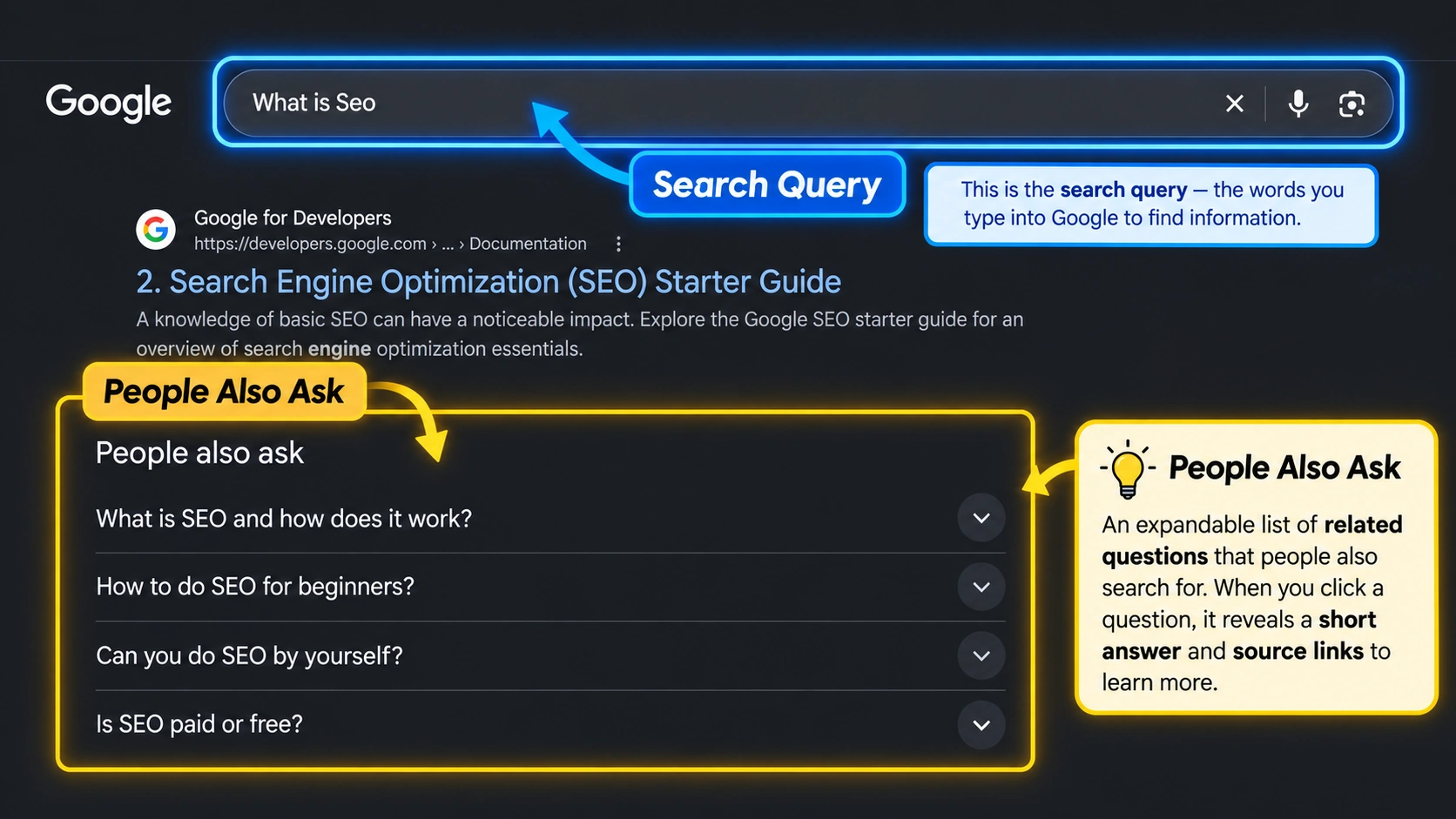
People Also Ask
People Also Ask (PAA) is an expandable box of related questions. Clicking one reveals a short answer with a source link and often loads more questions underneath. Google’s documentation calls it a related questions group, and featured snippets can appear inside it.
PAA exists to anticipate the next question. Someone who searches “what is a SERP” may want to know next how SERP features work or why rankings differ between users, and PAA brings those follow-ups onto the same page. It rewards pages that answer several closely related questions concisely, each under its own clear heading.
Local pack
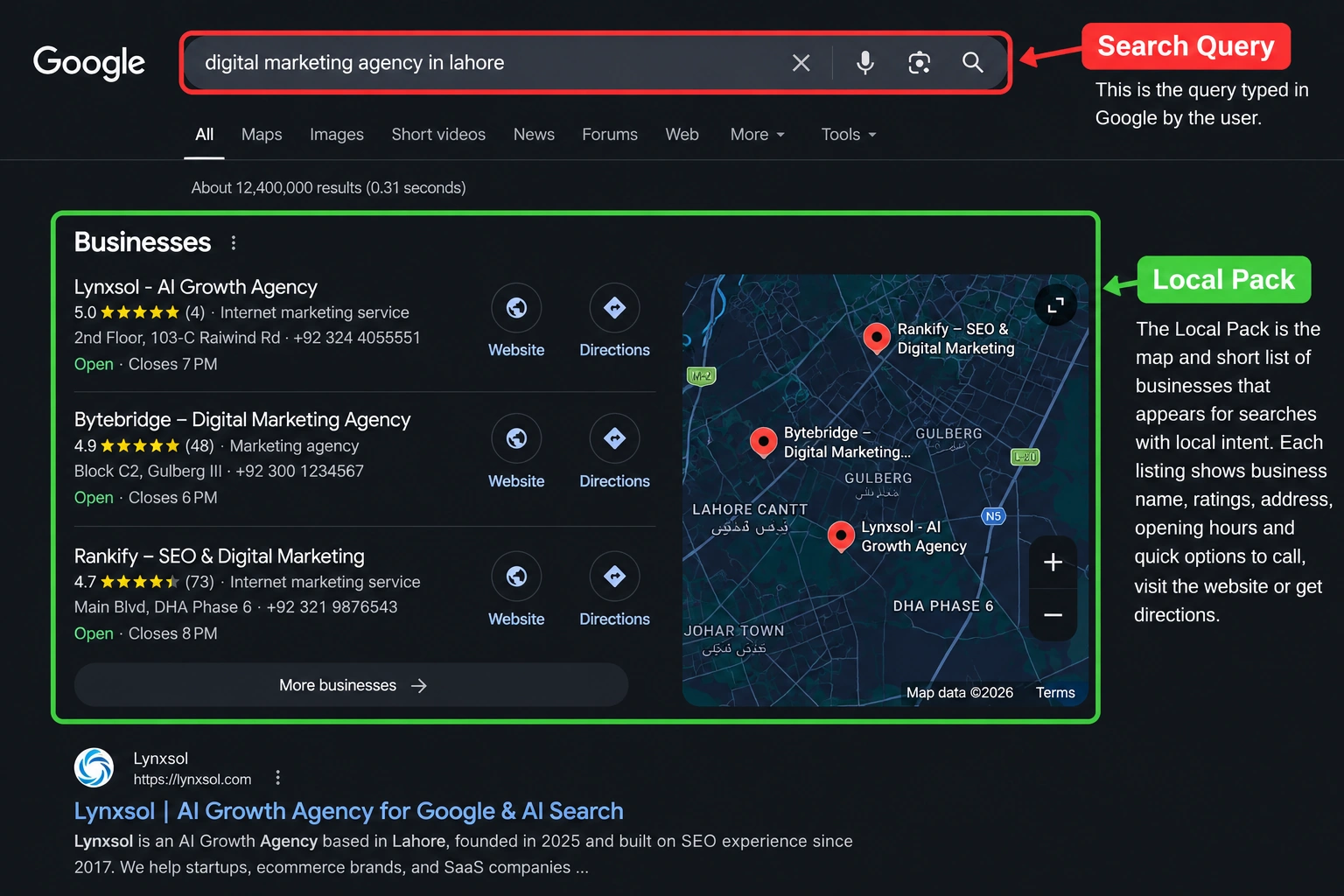
The local pack is the map and short list of businesses that appears for searches with local intent, such as “plumber near me” or “coffee shop downtown”. Each entry comes from a Google Business Profile and typically shows ratings, opening hours and options to call or get directions. Expanding the list opens fuller Google Maps results.
Google’s Business Profile documentation names three main local ranking factors: relevance to the search, distance from the searcher or searched location, and prominence, meaning how well known the business is. Local search visibility therefore depends as much on an accurate profile and genuine reviews as on the website itself. The mechanics of profiles and map rankings are covered on our local SEO page.
Knowledge panels
A knowledge panel is a box of key facts about an entity, such as a company, person or place, shown beside desktop results or near the top on mobile. Google generates it automatically from its Knowledge Graph, so consistent information about a brand across the web helps search engines, and AI answers, connect the right facts.
Image and video results
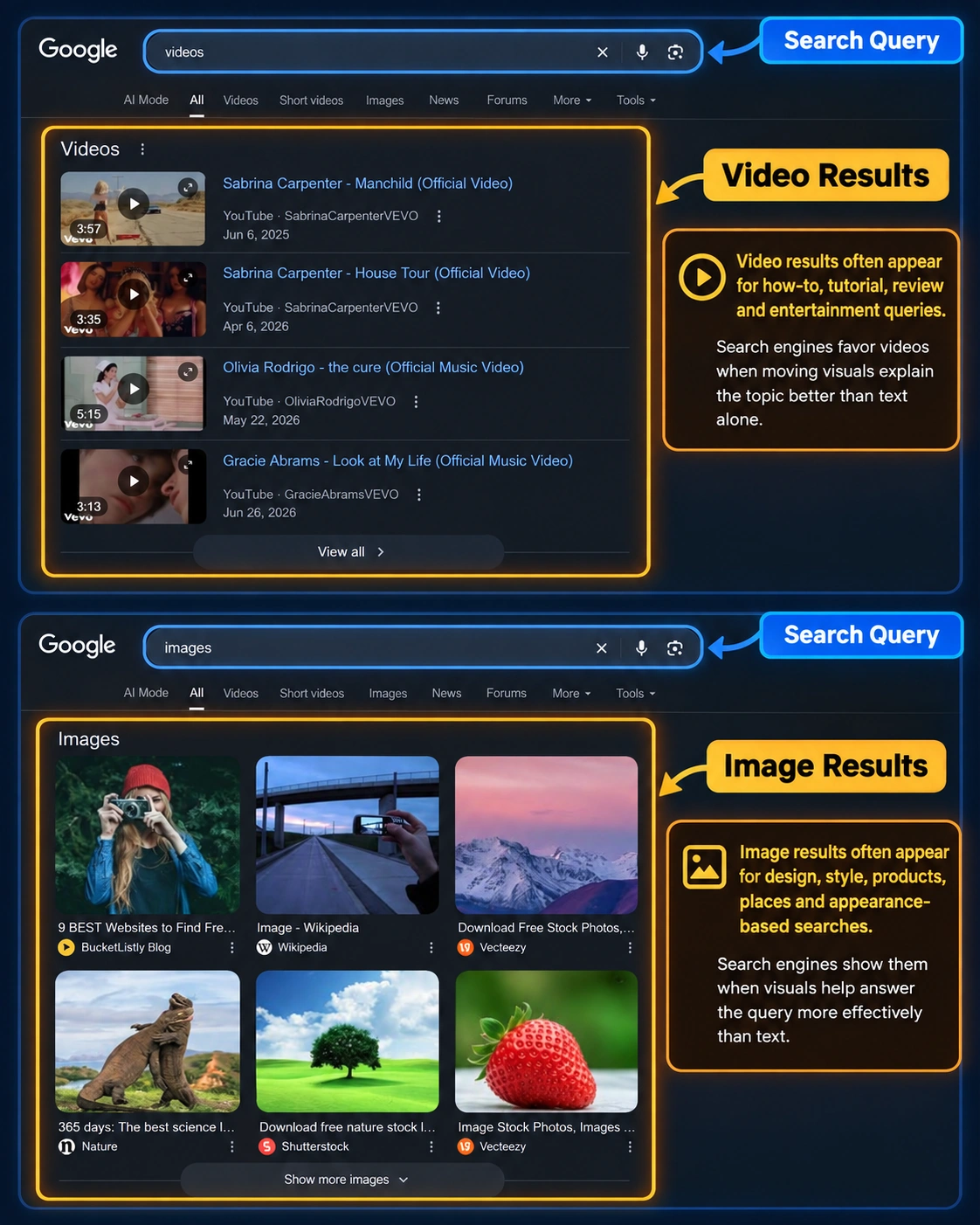
Image results and video results appear when visuals answer the query better than text. A definition query such as “what is a SERP” is served well by text, while “how to tie a bowline knot” is easier to follow on video. Searches about design, style or appearance tend to trigger image packs, while how-to, tutorial and entertainment queries tend to show a video carousel, often drawn from YouTube and other platforms. Search engines can only show media they can find and understand, so descriptive file names, alt text, captions, transcripts and a dedicated page for each important video all help.
Shopping results
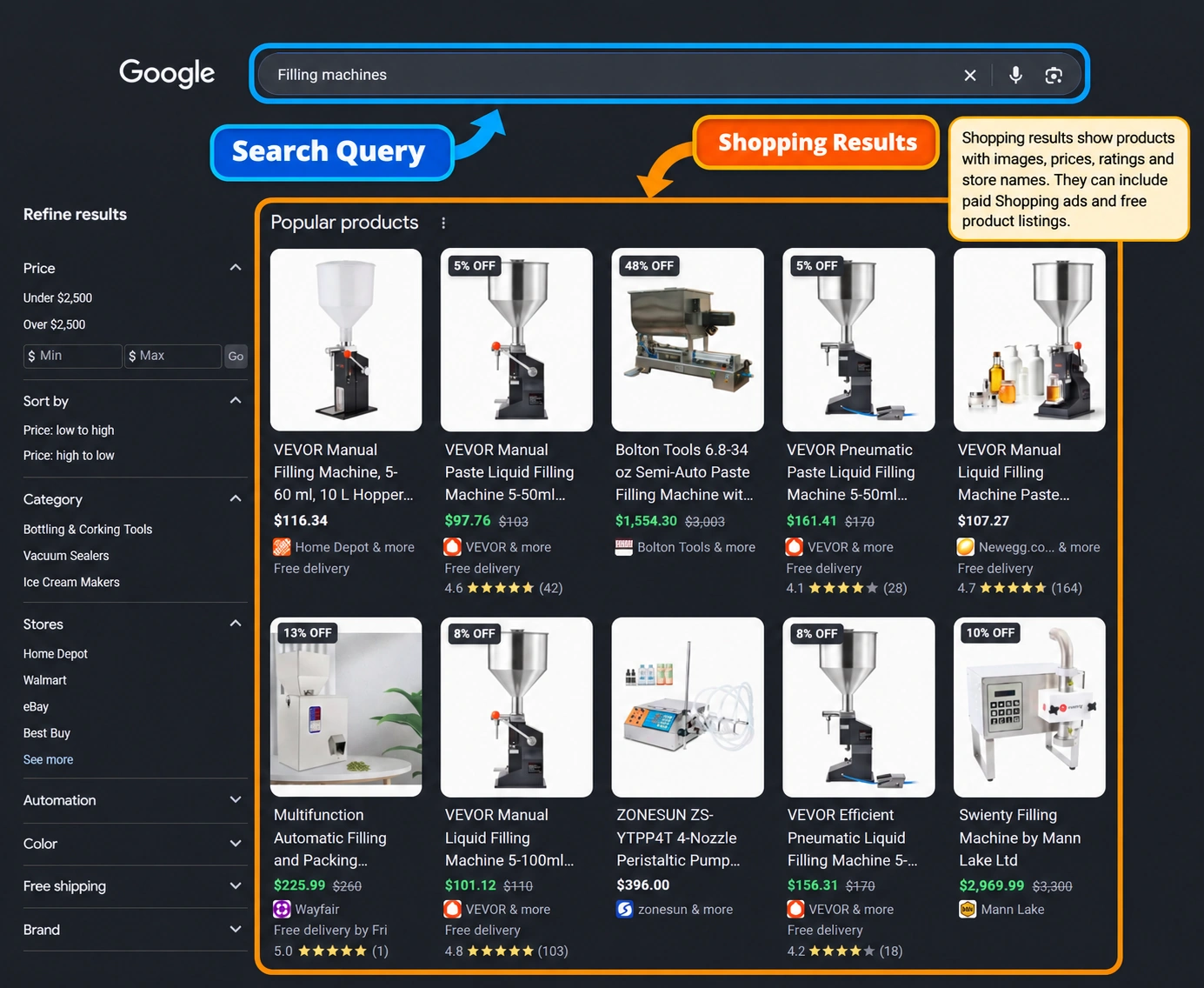
Shopping results show products with images, prices, ratings and store names. Some are paid Shopping ads; others are free product listings drawn from Merchant Center feeds and product structured data. They take up much of the page on many commercial and transactional searches, which is why product data quality sits at the center of ecommerce SEO.
Sitelinks, top stories and rich results
- Sitelinks are extra links beneath a result, mostly on navigational searches, that point to key sections of the same site. Google generates them automatically from the site’s structure.
- Top stories is a carousel of recent news articles for timely or trending queries.
- Rich results are enhanced listings, such as review stars, prices or event dates, that structured data can make a page eligible for. Eligibility isn’t a guarantee, and the set keeps changing: Google stopped showing FAQ rich results in May 2026.
AI Overviews and generative search results
AI Overviews are AI-generated summaries that appear at the top of some Google results pages, answering the query directly and linking to the web pages used to build the answer. They are the biggest change to the traditional SERP in years: on an informational query such as “what is a SERP”, the first thing a searcher reads may be a synthesized answer rather than a list of links.
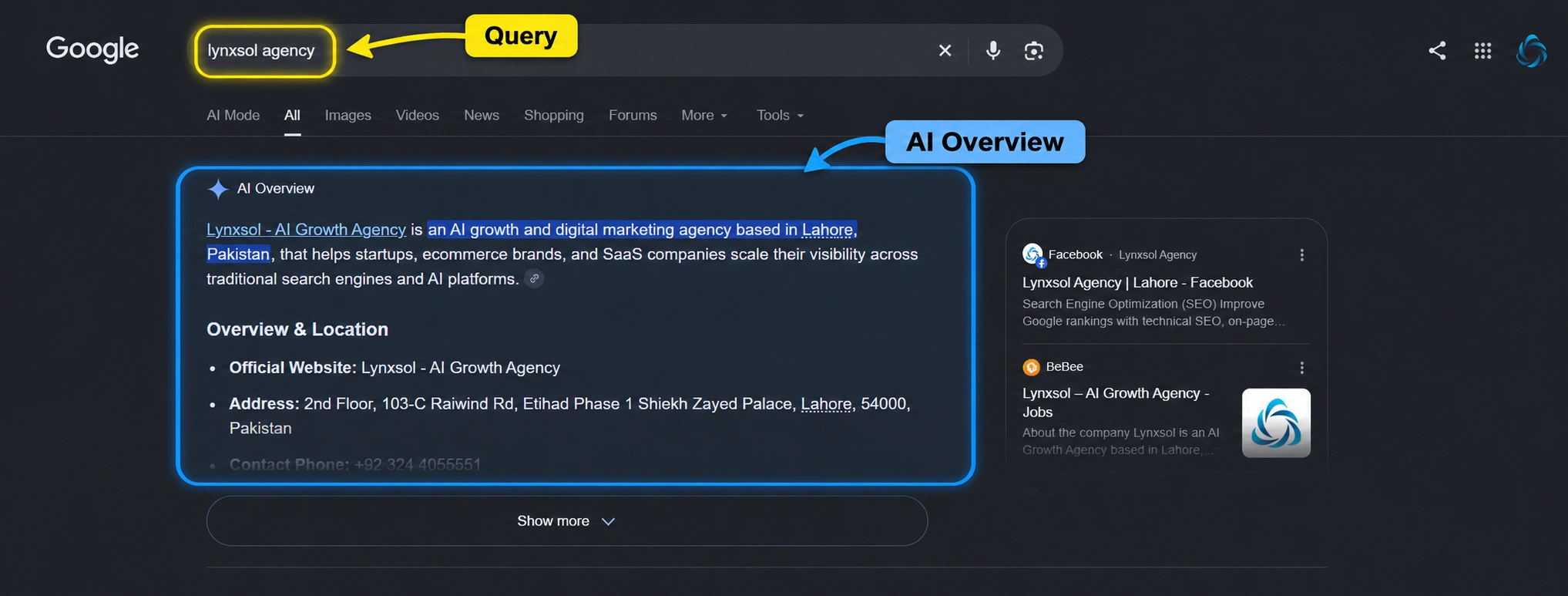
The scale is hard to ignore. In June 2026, Google reported that AI Overviews had more than 2.5 billion monthly active users, and that AI Mode, its conversational search experience, had passed one billion monthly users.
A few facts explain how these AI search results behave:
- They don’t appear on every search. Google says AI Overviews show only when its systems judge them additive to classic results, so many queries have none.
- They draw on more pages than a classic list. AI Overviews and AI Mode may use “query fan-out”, running several related searches across subtopics before composing an answer, which can surface a wider set of supporting links.
- Eligibility follows normal SEO rules. To appear as a supporting link, a page must be indexed and eligible to show with a snippet. Google states there are no additional requirements, and no special schema or AI text files are needed.
- Longer, question-style searches trigger them more often. A Pew Research Center analysis found that searches with more words, questions or full sentences produced AI summaries more often.
The same shift runs through answer engines and generative engines outside Google, such as ChatGPT search, Perplexity, Gemini and Microsoft Copilot. They compose an answer and cite sources rather than simply ranking pages. Ask one of them “what is a SERP” and you are likely to get a short written definition with a few cited sources instead of a list of links.
This is where GEO, or generative engine optimization, comes in: making content easy for these systems to understand, trust and quote. Google’s guidance is that SEO fundamentals still apply, and its May 2026 guide to optimizing for generative AI features puts particular weight on original, non-commodity content.
What zero-click search means
A zero-click search ends without the searcher visiting any website, because the answer was on the results page itself. AI answers have made this more common. In Pew Research Center’s analysis of March 2025 browsing data, users clicked a traditional result in 8% of visits to pages with an AI summary, against 15% on pages without one. They clicked a link inside the summary in about 1% of visits. Google has disputed the study’s methodology, but the direction is clear: being cited in the answer now matters as much as ranking beneath it.
How SERPs affect SEO rankings, clicks and traffic
Rankings and SERPs are two views of the same system. Ranking signals decide the order of results; the SERP is where that order becomes visible, alongside every feature competing for attention around it.
Three measures in Google Search Console connect the two:
- Impressions: how often your page appeared in results a searcher saw.
- Clicks: how often searchers clicked through to your site.
- Click-through rate (CTR): clicks divided by impressions.
SEO CTR, or organic click-through rate, explains why a high position doesn’t guarantee traffic. A first-place organic listing sitting below an AI Overview, several ads and a local pack can earn fewer clicks than a third-place listing on a plainer page. Ranking first for a query like “what is a SERP” means less if an AI Overview has already answered it above you.
Titles and snippets still influence that click. Google builds title links and snippets mainly from what is on the page, so a clear title, a descriptive opening and focused headings give it good material to work with. Search Console also counts appearances in AI Overviews and AI Mode within overall web search traffic, so AI visibility shows up in the same reports.
Search visibility beyond the blue links
Search visibility is how often your brand appears, anywhere on the results page or in answers built from it, for the searches that matter to you. That now includes organic listings, featured snippets, PAA answers, local packs, images, videos, shopping listings, knowledge panels and citations inside AI Overviews and other AI answers.
Take “what is a SERP” itself. One brand could appear in the AI Overview, the featured snippet, a PAA answer and an organic listing for that query, or in none of them. Counting only the organic position would miss most of the picture.
This is why traditional SEO, AEO and GEO increasingly overlap. Ranking earns a page consideration, answer-ready formatting gets it extracted into snippets and PAA, and clear, original, trustworthy content gives AI systems a reason to cite it. All three work on the same page, for different surfaces of the same SERP.
How to improve your visibility across SERPs
No single switch controls SERP visibility, but the same groundwork supports nearly every surface:
- Match search intent first. Study the current results for your target query and build the format they reward. For “what is a SERP”, that means a clear definition near the top, then depth.
- Make pages crawlable and indexable. Check that important pages are linked internally, not blocked by robots rules, and reported as indexed in Search Console.
- Answer questions directly. Open each section with a clear, self-contained answer, then add detail. The pattern suits featured snippets, PAA and AI answers alike.
- Structure content clearly. Descriptive headings, short lists and simple tables help readers and machines find the right passage.
- Use structured data where it fits. Accurate markup for products, organizations, articles, events and local businesses helps search engines understand a page, even though it doesn’t guarantee a rich result.
- Optimize images and video. Descriptive names, alt text and surrounding context help media appear in image and video results.
- Keep local details consistent. If you serve customers in person, keep a complete Google Business Profile and matching details across listings.
- Earn authority. Original insight, named expertise and links or mentions from respected sites help a page stand out from commodity content.
- Link related pages together. Internal links from supporting articles to core pages show search engines which pages matter most.
- Measure the whole page, not just position. Track impressions, CTR, SERP features won and AI citations alongside rank.
For a managed approach across a whole site, see Lynxsol’s SEO services.
Frequently asked questions
What is a SERP position?
A SERP position is where a result appears on the results page, usually counted from the top organic listing. Tools count positions differently: some include features such as featured snippets in the count, while Google Search Console reports an average position. Compare positions within one tool rather than across tools.
What is SERP analysis?
SERP analysis is the practice of studying the current results for a query before creating or optimizing content. It shows which formats rank, which SERP features appear, what intent the search engine is serving and how strong the competing pages are.
The bottom line
So, what is a SERP in 2026? It is no longer a simple ranked list of links but a composed page of answers, ads, listings and features, assembled for each query and each searcher. Understanding how that page is built is the first step in deciding where your content should appear on it.